On 56k connection a Webpage should load within 8 seconds. The following methods are all ways you can speed up your page load time.
1. Webpages that use JavaScript are programmed with the script at the top of the document. The content cannot be seen until the JavaScript has fully loaded. Put any JavaScript at the bottom of the document and it will load after the main content has finished, thus diminishing the loading time of the page. The page will still be loading when it is viewable within the browser but the user will be unaware of this.
2. Loading in external code such as style sheets or JavaScript files can also increase a page's load time. If you include the external files within the main html file it makes the code less readable but it also decreases the load time. When you've got your webpage working correctly, take some time to copy paste external code into the main html file.
3. There are three main formats of image that are used for webpages. These include: Portable Network Graphics (png), Joint Photographic Experts Group (JPEG) and Graphics Interchange Format (gif). Deciding on a format that both retains the quality of the graphic and lessens the file size is very important. A gif type image is the smallest format so if your graphics only contain a few colours then this would be the best choice. JPEGs can vary in quality and consequently in file size also. You should target the smallest size that doesn't reduce the quality of the graphic. PNGs can provide graphics with transparent backgrounds but have a larger file size than the two previous types. Bitmaps (bmp) are another familiar image file type but take up a large quantity of memory. These should be avoided altogether for web use to guarantee speedy page load times.
4. A minimal use of images, in particular animated gifs will also lessen page load time. An animated gif is made up of numerous different images and will have a substantially bigger file size than a regular graphic. The lower the file size of the externally loaded image, the quicker the page will load. The amount of images being loaded is also worth noting as it also effects page load time.
5. Animated gifs are quickly being replaced by swf files or Flash animations. However they're file size is significantly bigger than that of animated gifs. They should be used in moderation on a page and only where necessary. It is worth taking into consideration using an animated gif instead of a swf if your animation is short and doesn't require any user interaction. However if your animation requires sound a gif won't be up to scratch. The use of swfs will also require extra code to check if the user has a flash player installed. This requires further coding and is another reason to only use Flash files where necessary.
6. It is advisable to combine separate images where you can to lessen page load time. Two separate graphics will have a greater overall file size than one. The more images the page needs to load the more http requests it needs to carry out and this also increases loading time.
Showing posts with label Blog optimization. Show all posts
Showing posts with label Blog optimization. Show all posts
Add Google and Yahoo Sitemap to Blogger
Meta tags is the most commonly technique used by webmasters to optimize blog or site on search engines. Yesterday I had already discussed about meta tags for keywords and description. this time I will try to talk about meta tags for Sitemap.
Sitemap almost same as meta tag keyword and description where both are working to simplify search engine to crawl the contents on our site. The difference is with adding search engine sitemap on our blog so if have any change/update on our blog, the search engines will knew and immediately index our page on search engines.
Next I will explain how to add Google and Yahoo sitemap on blog because this both search engine which most widely used by internet users at this time.
How to add a Google sitemap on blog
1. Login to your gmail account then go to http://google.com/webmasters/tools
2. Enter your blog address in the box "Click here to add site". For example: http://hermanweb.blogspot.com. Then click Add site
3. Then it will appear the message "Your site has been added to your account .."
4. Click the Verify your site
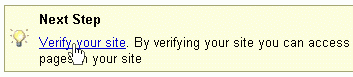
5. Click the dropdown menu and choose add a meta tag
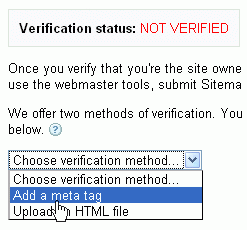
6. Copy the code in the box then put as an example that has been given
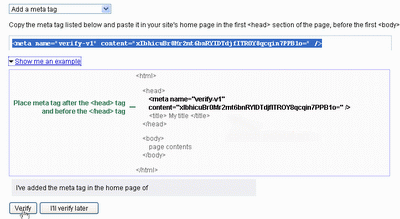 7. If you still confused, click the Edit HTML menu
8. Put the code above <title> <data:blog.pageTitle/> </ title>
9. If finished. Click Save Template then back to Google Webmaster Tools
10. Click Verify
11. If successful then it will appear the message "You've successfully verified .."
How to add Yahoo sitemap on the blog
1. Login to Yahoo mail then go to http://siteexplorer.search.yahoo.com/
2. Enter your blog address then click Add my site
3. click By adding a META tag to my homepage
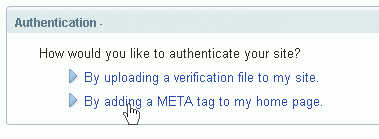
4. Copy the code which i circle below
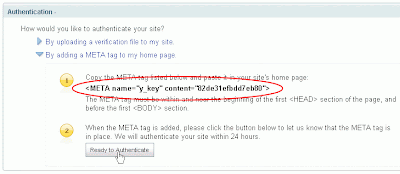
5. Go to Edit HTML blogger.
6. Put the code above <title><data:blog.pageTitle/></title>. If you have install Google sitemap. Put under it.
7. If done. Click Save Template then go back to Yahoo sitemap page. Click Ready to Authenticate.
8. If successful then it will show "Your site has been authenticated."
Have a try. Hope it useful
Sitemap almost same as meta tag keyword and description where both are working to simplify search engine to crawl the contents on our site. The difference is with adding search engine sitemap on our blog so if have any change/update on our blog, the search engines will knew and immediately index our page on search engines.
Next I will explain how to add Google and Yahoo sitemap on blog because this both search engine which most widely used by internet users at this time.
How to add a Google sitemap on blog
1. Login to your gmail account then go to http://google.com/webmasters/tools
2. Enter your blog address in the box "Click here to add site". For example: http://hermanweb.blogspot.com. Then click Add site
3. Then it will appear the message "Your site has been added to your account .."
4. Click the Verify your site

5. Click the dropdown menu and choose add a meta tag

6. Copy the code in the box then put as an example that has been given
 7. If you still confused, click the Edit HTML menu
8. Put the code above <title> <data:blog.pageTitle/> </ title>
9. If finished. Click Save Template then back to Google Webmaster Tools
10. Click Verify
11. If successful then it will appear the message "You've successfully verified .."
How to add Yahoo sitemap on the blog
1. Login to Yahoo mail then go to http://siteexplorer.search.yahoo.com/
2. Enter your blog address then click Add my site
3. click By adding a META tag to my homepage

4. Copy the code which i circle below

5. Go to Edit HTML blogger.
6. Put the code above <title><data:blog.pageTitle/></title>. If you have install Google sitemap. Put under it.
7. If done. Click Save Template then go back to Yahoo sitemap page. Click Ready to Authenticate.
8. If successful then it will show "Your site has been authenticated."
Have a try. Hope it useful
Add Meta Tag Keyword and Description On Blogger
In order to continue previous post about how to submit blog to search engines and tips blog quickly indexed by search engine. So on this post I will discuss about SEO (Search Engine Optimization) again.
There are many SEO techniques that can be applied to optimize blog. Such as link building, optimizing content, add meta tag, and submit blog to search engine or directory.
From all above techniques, the easily techniques to applied is Add Meta Tag. Adding meta tags on the blog same as give identity on our blog. The purpose is to simplify search engine recognize content on our blog. Because the first time crawled by search engine is the blog title, so how good if we can insert description or keyword associated with the content of our blog on that page.
To add meta tags in blogger is very simple:
1. Open blogger. Click Layout -> Edit HTML
2. Put the meta tag script below under <title><data:blog.pageTitle/></title>
Blog description: description about your blog. Example: "tips to keep your body healthy". Try to keep sentence no more than 150 character.
Blog keyword: fill keyword that related to your blog. For example: "health tips, health product, health care". Try not to repeat 1 word more than 3 times and did not fill out the keywords that are not relevant to the content of your blog. For example, your blog contain about health then you give keyword "free download, porn video" which are a popular keywords on the net. Because this will be considered as spamming.
Index follow: means for requesting a web spider to indexed link in the homepage. If you do not want the web spider to index link on your homepage. Use "noindex nofollow".
3. If finished, click Save Template. Done.
Have a try. Hope your blog more familiar with Google and their friends.
There are many SEO techniques that can be applied to optimize blog. Such as link building, optimizing content, add meta tag, and submit blog to search engine or directory.
From all above techniques, the easily techniques to applied is Add Meta Tag. Adding meta tags on the blog same as give identity on our blog. The purpose is to simplify search engine recognize content on our blog. Because the first time crawled by search engine is the blog title, so how good if we can insert description or keyword associated with the content of our blog on that page.
To add meta tags in blogger is very simple:
1. Open blogger. Click Layout -> Edit HTML
2. Put the meta tag script below under <title><data:blog.pageTitle/></title>
<meta name="description" content="blog description"/>Change the red text above according to the explanation below:
<meta name="keywords" content="blog keyword"/>
<meta name="robots" content="index follow"/>
Blog description: description about your blog. Example: "tips to keep your body healthy". Try to keep sentence no more than 150 character.
Blog keyword: fill keyword that related to your blog. For example: "health tips, health product, health care". Try not to repeat 1 word more than 3 times and did not fill out the keywords that are not relevant to the content of your blog. For example, your blog contain about health then you give keyword "free download, porn video" which are a popular keywords on the net. Because this will be considered as spamming.
Index follow: means for requesting a web spider to indexed link in the homepage. If you do not want the web spider to index link on your homepage. Use "noindex nofollow".
3. If finished, click Save Template. Done.
Have a try. Hope your blog more familiar with Google and their friends.
Tips Blog Quickly Indexed By Search Engine
 Before i've mention about how to submit blog to search engine in order to easier blog get indexed. It's true by doing this, can speed up the process of listing blog in search engine such as Google, Yahoo, MSN, etc. But only doing that, of course is not enough because it can take up 2-3 weeks.
In order to To quicken the index process. You can use some of the following tips. Although it's not 100% guarantee, but i have try this way and all my blog indexed within 1-3 days. Ok here the tips:
1. After creating the blog. Write minimal 1-2 articles in your blog.
2. After that, ping your blog with Ping-o-matic. Ping-o-matic is a free service to inform search engines to update your blog. Do the ping only when you post a new article. Do not use this service too often because can be considered as spamming.
3. Submit your blog to Technorati. Why Technorati? Because Technorati is the largest directory site at this time with Page Rank 9 so with submit your blog there. It will increase your blog popularity in order to easier your blog get indexed.
Ok I think that's all. Actually still have other ways. But I think that is enough to quicken your blog indexed in search engines. To check whether your blog have been indexed or not. Type site:yourblogname.com. For example: site: hermanweb.blogspot.com. If your blog appear in search engines pages means your blog already indexed.
Happy blogging

How To Submit Blog To Search Engine
For a blog was just created usually not immediately indexed by search engines likes Google, Yahoo, MSN and others. In order to listed your blog on search engine index pages. You need to submit your blog on search engine. Although this may not guaranteed your blog will be indexed immediately , but with this way, your blog will be priority.
There are many search engines on internet but the most widely used are Google, Yahoo, and MSN. Here are the steps to submit your blog to search engines.
Submit to Google
1. Visit http://www.google.com/addurl/
2. Then you will be prompted to fill your blog data
Submit to Yahoo
1. Visit https: / / siteexplorer.search.yahoo.com / submit
2. Sign in with your yahoo id.
3. Click Submit a Website or Webpage
4. Enter your blog address then click Submit URL
Submit to MSN
1. Visit http://search.live.com/docs/submit.aspx
2. Enter the text shown on the image and fill your blog URL
3. Click Submit URL. Done
Submit to more than 40 other search engines
1. Visit http://www.submitexpress.com/
Once you submitted, you must wait several days for search engines to indexed your blog. To check whether your blog has been indexed or not. Type site: yourblogname.com in the search box. For example: site: hermanweb.blogspot.com
Have a try. Hope it useful
There are many search engines on internet but the most widely used are Google, Yahoo, and MSN. Here are the steps to submit your blog to search engines.
Submit to Google
1. Visit http://www.google.com/addurl/
2. Then you will be prompted to fill your blog data
URL: Enter your blog URL. For example, http://hermanweb.blogspot.com3. If done. Click Add URL
Comments: Enter keyword or description about your blog
Optional: Enter text shown on the box
Submit to Yahoo
1. Visit https: / / siteexplorer.search.yahoo.com / submit
2. Sign in with your yahoo id.
3. Click Submit a Website or Webpage
4. Enter your blog address then click Submit URL
Submit to MSN
1. Visit http://search.live.com/docs/submit.aspx
2. Enter the text shown on the image and fill your blog URL
3. Click Submit URL. Done
Submit to more than 40 other search engines
1. Visit http://www.submitexpress.com/
Once you submitted, you must wait several days for search engines to indexed your blog. To check whether your blog has been indexed or not. Type site: yourblogname.com in the search box. For example: site: hermanweb.blogspot.com
Have a try. Hope it useful
Subscribe to:
Posts (Atom)