Showing posts with label YouTube. Show all posts

How to Download and Play YouTube Video on Computer

For you who often watch the video on You Tube. Certainly want to monumentalize the videos on your computer so you can play back at any time without connected to the internet. The only way is downloaded the video to the computer. This will save the cost of your Internet connection and will easily you to enjoy the videos.

However, it is not easy to download video on You Tube because it does not provide download facility on You Tube menu so to download it, you must use a third party program. There are many programs or tools that you can use to download videos from You Tube such as the YouTube Downloader, IDM, Downloadhelper Video (Firefox add-ons), keepvid.com, etc.

But would i like to discuss here is download with You Tube Downloader. Because this the way I use to :)

1. Download Youtube downloader here. After that installed it

2. Go to the YouTube.com. Open a video you want to download.

3. Then copy the url of the video on address bar . For example: http://www.youtube.com/watch?v=cQP7HHOjNe8&feature=bz303

4. Open You Tube Downloader program

5. Paste an URL on the box then click OK

you tube downloader
6. Wait until the download process completed.

7. After successful, then the file will be saved in your computer.

How to Play You Tube Video On Computer
Because the downloaded file format was . FLV then you need FLV Player to open the video. Click here to download the program. After that, install the program. If done, open and enjoy the video..


Upload Video To YouTube

If you have own video or any videos that want to share to the Internet. So you need video hosting to save your videos. There are many services you can use. One of them is YouTube.

Before uploading, make sure that the video already meet the terms and conditions of YouTube. The requirements among other.
  • Format video: WMV, MPEG4, MOV, AVI, MPEG,
  • Durasi video kurang dari 10 menit
  • Ukuran video kurang dari 1GB
If you have meet the requirements above then the next step is upload them to YouTube. Here are the steps:

1. Visit YouTube.com then sign-in

2. If you do not have an YouTube account yet. Click Sign-up to create first.

3. If done. Click Upload


4. Click Browse and choose the video you want to upload.

5. If done, click Upload Video

6. Fill the video data:
Title: Video title
Description: Video description
Tags: Keywords that are related to the video. It useful so the video can be found in search engines page when someone type that keyword at search box
Category: Choose the related category with the video
Privacy: Select Public if you want your video can be watch by all people or Private if you want your video only can be watch by up to 25 people.

7. If done, click Save Changes

8. Wait until the uploading process completed

9. After successful, will appear a message "Success: Your video settings have been successfully saved."

10. Click Go To My Videos to see the video that you upload.

Add YouTube Video To Blogger

youtubeAlready know with You Tube? The most popular and largest video sharing site at this time. In this site you can watch and share your favorite video to everyone.

Then, are the video on You Tube can added to the blog so blog's visitors also can watch and enjoy the video we prefer? The answer is yes and very easy to implemented. You can simply copy the code provided by You Tube then paste to your blog. Done.

Well for more details please follow the steps below:

1. Go to the You Tube site. Open the video that you want to attach.

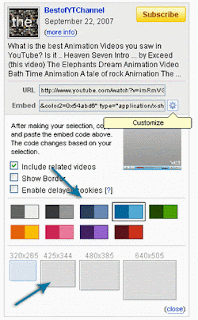
2. Click Customize and select the frame color and size of the video you want

youtube customize

3. If done, copy the code in the "Embed" box then paste it to your blog.

4. If successful then the video will appear on your blog like this


You Tube Launch Video Based On Education

As is reported by some media that the largest video sharing service at this time, Youtube, just released new features, namely Youtube Edu. Youtube Edu will presents a variety of free educational video content from various universities, including MIT, Stanford and others.

This may be quite useful content for students, lecturers, or people who want to expand the knowledge.

Youtube classify based on the University, and likely only a universities in the United States and there is no category based on subjects or specific themes. Want to know more, visit http://www.youtube.com/edu